Fine-tuning with LoRA: Colab, CHTC, or AWS
Fine-tuning lets us adapt an existing model to a specialized task without training a new one from scratch. In this exercise, we’ll fine-tune CHURRO-3B, a vision-language model for historical documents, to transcribe handwritten German letters from the Badger Scribe challenge. The letters are written in Kurrent, a historical form of German handwriting that can be difficult for even specialized handwriting recognition models.
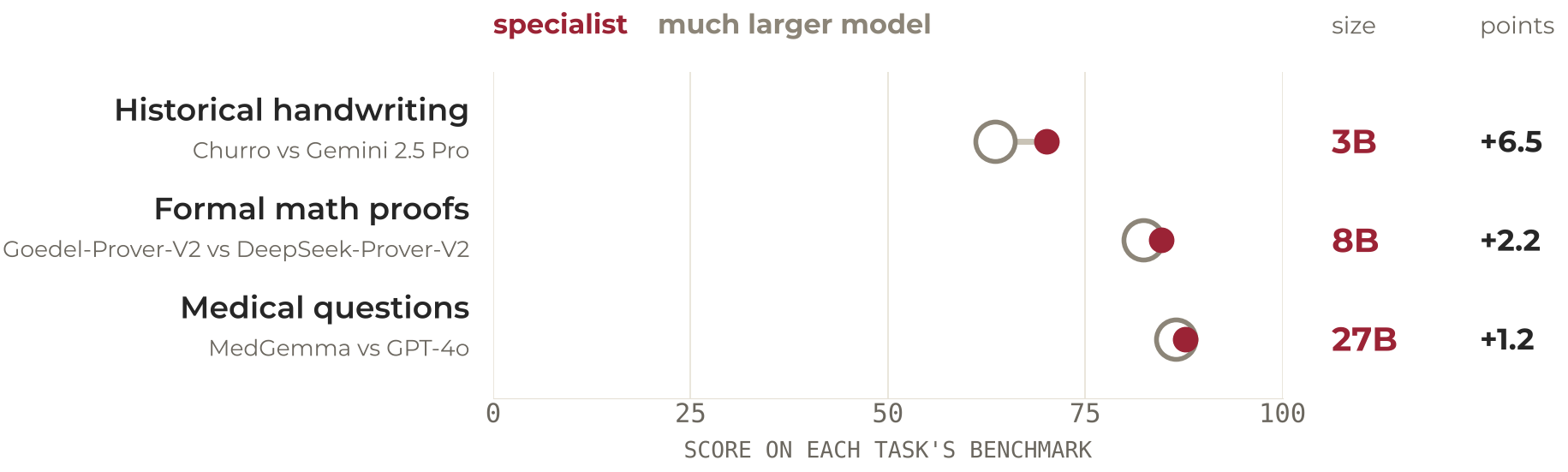
We’ll use LoRA (low-rank adaptation), which freezes the original model and trains a small adapter beside it. For this model, that cuts the GPU memory needed from about 60 GB to about 12 GB, so the fine-tune runs on a single GPU. On a GPU as small as Colab’s free 16 GB T4, the frozen weights are loaded in 4-bit, a variant called QLoRA, which brings the run to about 6 GB.
What you’ll do
Using 295 transcribed pages from the Anna Seifert correspondence, you’ll evaluate CHURRO’s initial transcription accuracy, fine-tune it for two epochs, and compare its performance on held-out pages. By the end, you will be able to:
- Explain when fine-tuning an existing model beats training one from scratch, and why GPU memory decides between full fine-tuning, LoRA and QLoRA.
- Estimate the size of a fine-tuning run before launching it. Tokens per page set the time and the adapter rank sets the trainable parameters, and both come from the model’s own processor and config file.
- Run a LoRA fine-tune of a 3B vision-language model on a single GPU, testing on a slice of the data first and checkpointing every epoch.
- Judge whether the fine-tune helped by comparing the model before and after on the same held-out pages with the task’s own metric, character error rate (CER), and by reading the held-out curve to see how many passes were worth it.
- Reuse the saved adapter, about 100 MB, to transcribe new pages, including the challenge’s 141 unlabeled test pages.
The exercise is available on three platforms. Start with the Colab notebook if you’re new to fine-tuning; it requires only a Google account. The CHTC and AWS versions take the same workflow to campus or cloud GPU infrastructure.
Where to run it
 |
CHTC | AWS SageMaker | |
|---|---|---|---|
| How it runs | Interactive notebook | HTCondor batch job | Managed training job |
| GPU | T4, 16 GB, on the free tier; larger GPUs on paid plans | L40S, A100, H100, H200 | A10G, 24 GB, in this exercise. By the hour, anything from a T4 up to 8-GPU H100, H200, B200 and B300 servers |
| Estimated runtime | ~1.5 hours | ~20 minutes plus queue | ~33 minutes |
| Compute cost | Free | Free | ~$0.75 |
| What you’ll learn | Fine-tuning with limited GPU memory | Containers, batch jobs and data staging | Cloud training jobs and cost management |
| Status | Ready | Guide in development | Ready |
Google Colab is the easiest starting point and needs only a Google account. It is a place to learn fine-tuning, not to run a project: free GPU availability varies, sessions end after a few hours of use or 90 minutes idle, and the notebook saves checkpoints to Google Drive so a dropped session costs one epoch. Expect to get through the notebook about once before the free tier’s GPU limit cuts you off for the day, so run it in one sitting if you can.
CHTC is the first choice for UW-Madison researchers. It is free and has GPUs with 48 to 141 GB of memory; jobs wait in a queue. The CHTC version packages the job in a container and submits it through HTCondor; you need a CHTC account with a faculty sponsor, GPU Lab access and a /staging directory. The guide is still in development and has not been tested end to end. CHTC’s facilitators hold office hours for setup questions.
AWS SageMaker runs the same exercise as a managed training job. The fine-tuning episode is part of the Intro to AWS for ML/AI workshop and covers estimating costs, setting runtime limits, launching jobs and tracking spending. It assumes the SageMaker setup and GPU quota from the workshop’s earlier episodes. UW researchers can use UW Cloud Services for institutional AWS accounts, and the Public Cloud Team’s office hours for help.
The National Research Platform (NRP) also offers free GPU resources, including notebook-based access, although a separate version of this exercise is not yet available.
Prerequisites
Basic Python skills and familiarity with model training and evaluation are recommended. These resources provide useful background:
- Workshop: Basic Python Programming
- Workshop: Intro to Machine Learning
- Notebook: Understanding Quantization and Precision, recommended. Quantization and precision come up in all three versions, and this notebook explains what the formats cost in GPU memory
Comments